A VMI program flips the normal buying relationship: instead of you raising purchase orders, your supplier watches your stock levels and replenishes before you run out. Done well, vendor managed inventory takes a whole category of ordering work off your team's plate and keeps availability high with l
Every VMI program is a bet on one data feed
A VMI program flips the normal buying relationship: instead of you raising purchase orders, your supplier watches your stock levels and replenishes before you run out. Done well, vendor managed inventory takes a whole category of ordering work off your team's plate and keeps availability high with less stock. Done badly, it becomes an argument about whose numbers are right. We covered the failure mode in detail in our field playbook on why VMI breaks outside the warehouse; this post is the how-to. Scoping, the agreement, the process loop, and the one condition that decides whether any of it works: real consumption data from the locations the supplier is replenishing.
That last point is the part most setup guides skip. If your VMI program covers a distribution centre with a warehouse management system, the data feed is a solved problem. If it covers consignment cabinets at customer sites, forward stocking locations and engineer vans, it is not. Plan for that first and the rest of the setup is straightforward.
What a vendor managed inventory program actually is
In a vendor managed inventory program, the buyer shares stock and consumption data with the supplier, the two parties agree minimum and maximum stock levels per item per location, and the supplier takes responsibility for keeping stock inside that band. The purchase order still exists, but it is generated by the supplier's replenishment decision rather than by your procurement team. Ownership of the stock transfers on delivery under standard terms, or stays with the supplier until use if the program is combined with consignment.
Companies keep signing up for this model because the ordering workload it removes is real. According to Verified Market Research, the vendor managed inventory system market was valued at $3.69 billion in 2023 and is projected to reach $5.28 billion by 2031, growing at 5.3% a year. The model is decades old; the growth is coming from new environments, including field and consignment locations that older VMI tooling never reached.

Vendor managed inventory benefits, honestly stated
The benefits case is well established on both sides of the relationship:
- For the buyer: fewer stockouts, lower carrying costs because replenishment tracks actual demand, and a procurement team freed from routine reordering.
- For the supplier: real consumption visibility instead of distorted order patterns, smoother production planning, and a customer relationship that is hard to displace.
- For both: one agreed set of numbers, and a review cadence that surfaces problems in weeks rather than at contract renewal.
Every one of those benefits depends on the supplier seeing true consumption. Feed the program stale or estimated data and the same mechanism runs in reverse: confident, automated replenishment of the wrong quantities to the wrong places. That is the trap the rest of this guide is designed around.
Step 1: scope the program before you talk terms
Do not start with the contract. Start with three scoping decisions:
- Which items. VMI earns its keep on items with steady, measurable demand: fast movers, consumables, standard spare parts. Erratic, engineered-to-order items make poor first candidates, because no supplier can set a sensible min/max on lumpy demand.
- Which locations. List every stocking point the program will cover and be honest about each one's data capability. A warehouse with scanning is VMI-ready. A consignment cabinet at a hospital or a van shelf is only ready once you can capture usage there.
- Which supplier. Pick a first-wave partner with capacity to plan replenishment, not just fulfil orders, and the willingness to review performance monthly while the program beds in.
A pilot of one supplier, one product family and a handful of locations beats a big-bang rollout. You are proving a data loop, not negotiating a volume discount.
Step 2: the vendor managed inventory agreement
The agreement is where vague intentions become enforceable mechanics. Whatever template you start from, make sure these six things are written down explicitly:
- Ownership and title transfer. State exactly when stock stops being the supplier's and becomes yours: on delivery, on putaway, or on consumption if the program runs on consignment terms. Ambiguity here resurfaces as a shrinkage dispute.
- Min/max levels per item per location. The replenishment band is the heart of the deal. Set it per location, not globally, and name who may change it and how often it is reviewed.
- Billing triggers. Define the exact event that creates an invoice: shipment, delivery confirmation, or a recorded consumption event. If billing fires on consumption, the agreement must also say how consumption is captured and how disputes get resolved.
- Data sharing obligations. What data flows to the supplier, in what format, how often, from which locations. Daily stock and usage per stocking point is a reasonable baseline; monthly spreadsheets are not a VMI data feed.
- Service levels and metrics. Fill rate, stockout count, inventory turns and forecast accuracy, with targets and a monthly review. Without agreed metrics, performance conversations become an exchange of anecdotes.
- Liability and exit. Who pays for obsolete and slow-moving stock, what happens to supplier-owned stock at your sites if either party walks away, and how much notice unwinding takes.
One practical note from manufacturers who run these programs: negotiate hold periods and must-take deadlines for slow movers up front, typically 30 to 120 days, so neither side is surprised when demand shifts.
Step 3: run the vendor managed inventory process as a loop
The vendor managed inventory process is a five-step cycle, not a one-off integration project:
- Capture. Stock levels and consumption events are recorded at every covered location, ideally by scanning at the moment of use.
- Share. The data reaches the supplier automatically, through an integration or portal, on the cadence the agreement defines.
- Decide. The supplier compares actual levels against the min/max band and plans replenishment quantities and timing.
- Replenish. Stock ships, is received and put away, and the receipt is confirmed back into both systems of record.
- Review. Both parties look at the metrics monthly, adjust min/max levels for seasonality and demand shifts, and expand or trim the item list.
Step 5 is the one that quietly dies first. Calendar the reviews before go-live and treat a skipped review as an incident, because a min/max band set in January is wrong by July in most businesses.
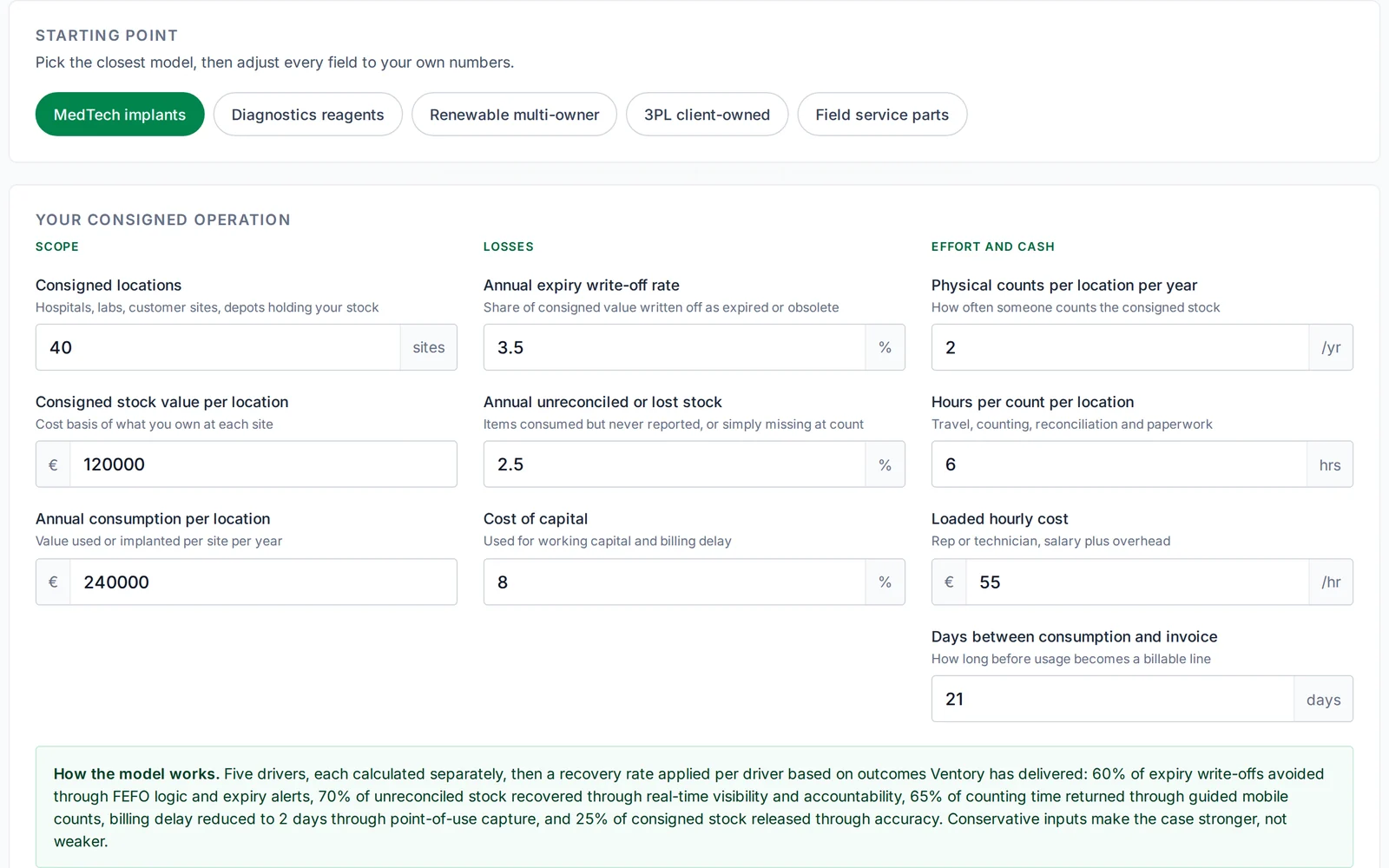
The make-or-break condition: consumption data from the field
Here is the condition most VMI guides never mention. Steps 2 through 5 all consume the output of step 1, and step 1 is trivial inside a warehouse and genuinely hard everywhere else. Customer sites, consignment points and vans have no WMS, no terminal and no one whose job is data entry. Usage gets reported late, estimated or not at all, and the supplier plans replenishment on fiction.
The fix is to give every field location a lightweight way to record consumption at the moment it happens: a technician scans a part out of the van, a nurse scans an implant out of the cabinet, a site manager scans a filter out of the forward stocking location. That single scan updates consigned stock records, fires the billing trigger if the program runs on consumption billing, and feeds replenishment with real demand instead of estimates.
This is the layer Ventory provides. Field teams scan any barcode on a phone, offline if needed, and the data syncs to your ERP and to the supplier's planning view. Operations running scan-based field inventory this way reach 99.76% stock accuracy, and across deployments customers typically see up to 70% fewer stockouts and around 30% higher field productivity, with a program live in 2 to 3 months. Whether you use Ventory or build the capture layer another way, the rule stands: no consumption data from the field, no VMI program in the field.
Consignment vs VMI: two answers to two different questions
The two models get conflated constantly, including in supplier pitches, so pin the distinction down before you sign anything. Consignment answers an ownership question: the supplier's stock sits at your site and you pay only when you use it, but deciding when to top up remains your job unless you agree otherwise. VMI answers a replenishment question: the supplier decides when and how much to restock within the agreed band, while ownership typically passes to you on delivery and billing fires on shipment or delivery.
The strongest field programs combine both: the supplier owns the stock until the moment of use, the supplier also plans the replenishment, and billing fires on the recorded consumption event. That combination concentrates everything on one requirement, accurate point-of-use data, which is exactly why the capture layer matters so much. We compare tooling for this model in our guide to the best consignment inventory software and VMI tools.
At a glance
| Model | Who owns the stock at your site | Who decides replenishment | Billing trigger |
|---|---|---|---|
| Consignment | Supplier, until use | You | Recorded consumption |
| VMI | You, from delivery | Supplier, within min/max | Shipment or delivery |
| Consignment + VMI | Supplier, until use | Supplier, within min/max | Recorded consumption |
Examples of vendor managed inventory in the field
What this looks like in practice, across the industries where stock lives outside the four walls:
- MedTech consignment cabinets. A device manufacturer stocks implants and instruments at hospitals, replenishes against scanned usage from each cabinet, and bills on consumption. This is the classic consignment-plus-VMI combination; our consignment inventory management guide covers the model end to end.
- Industrial consumables. A fastener or PPE supplier owns the bin program on a plant floor, with min/max per bin and weekly top-ups planned from scan or weight data.
- Utility and telecom van stock. A distributor replenishes engineer vans against parts scanned out on jobs, so each van is restocked on what it actually used, not on a standard kit list.
- 3PL forward stocking locations. A manufacturer keeps critical spares at depots near customer sites, with the logistics partner replenishing each depot inside an agreed band.
Field notes
- Scope the data feed per location before you scope the contract; every location without a capture method is a location the supplier will plan blind.
- Write the billing trigger as an event your systems can actually record. If nothing scans, nothing should invoice.
- A min/max band nobody has reviewed in six months is not a program, it is a guess with a signature on it.
Setting up a VMI program across customer sites, consignment points or vans? Book a demo and see how field consumption data flows from a scan to your ERP and your supplier's planning view.
Frequently asked questions
What is a VMI program?
A VMI program is a supply agreement in which the supplier monitors the buyer's stock levels and decides when and how much to replenish, within minimum and maximum levels both parties agree per item and location. The buyer shares stock and consumption data; the supplier takes over the routine ordering.
What should a vendor managed inventory agreement include?
At minimum: when ownership transfers, min/max levels per item per location, the exact billing trigger, data sharing obligations, service level targets with a review cadence, and liability plus exit terms for slow-moving and supplier-owned stock. If any of the six is missing, expect a dispute about it within the first year.
Who owns the inventory in a VMI program?
Under standard VMI terms the buyer takes ownership when stock is delivered, even though the supplier decided the shipment. When VMI is combined with consignment, the supplier keeps ownership until a consumption event is recorded, and that event triggers the invoice. The agreement should state the transfer point in one unambiguous sentence.
What is the difference between consignment and VMI?
Consignment defines who owns the stock: the supplier, until you use it. VMI defines who plans replenishment: the supplier, within an agreed band. They are independent choices, which is why many field programs combine them: supplier-owned stock, supplier-planned replenishment, billing on recorded use.
How long does it take to set up a vendor managed inventory program?
A single-supplier pilot on warehouse stock can run inside a quarter. Programs covering field locations take longer only if the consumption data layer is missing; with a scanning tool in place at each location, a phased rollout is realistic in 2 to 3 months, agreement included.
Related reading
- Vendor managed inventory in 2026: why it breaks outside the warehouse
- The 2026 guide to consignment inventory management
- Best consignment inventory software and VMI tools in 2026
About Ventory
Ventory is the field inventory layer for regulated, high-stakes industries. We give MedTech, 3PL, Aerospace, Energy and FMCG leaders real-time visibility and control over inventory outside the four walls, in hospitals, ambulances, trunk stock, consignment locations, and field service vans. Ventory is ERP-agnostic (SAP, Oracle, Dynamics, Sage, NetSuite) and trusted by a global medtech manufacturer, a national ambulance service, global logistics and consumer-goods operators. See how it works →
Ten questions. You get a field readiness score, a gap tier and the three fixes worth doing first.

Ventory is the field inventory layer between your ERP or WMS and the teams working outside the warehouse: engineer vans, forward stocking locations, consigned stock and loaner kits.
About Ventory